
I get asked frequently about a dilemma that people run into with inexpensive video cameras. They need to shoot a video where the camera will be far away from the subject…yet the camera only has a built-in microphone with no options to plug in an external microphone.
What to do?
Well, to find the quick and simple answer, we turn to the world of film. You see, with video, both the audio and video are recorded simultaneously to the same tape. But with film, no audio is recorded to the film…just the moving images. The audio must be recorded separately on another device, and then synced to the film during editing.
 We’ve all seen the clapperboards used in Hollywood. And these clapperboards serve a couple purposes. One is to log the shot information and another is to help the film editor sync the film with the audio during editing. In other words, the clapperboard being clapped gives the editor a visual cue of when a shot starts…as well as an audio cue as to where the audio starts. The editor can then sync the film and the audio together using those cues.
You can do the same in the world of video when your camera doesn’t support an external microphone. In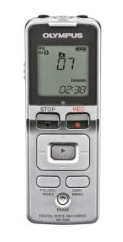 lieu of the external microphone, you can just use a digital voice recorder. Many voice recorders also support plug in microphones, allowing you to “mic up your talent” with a lavaliere style microphone if you choose.
You simply record your video from the camera, while simultaneously recording the audio on your digital voice recorder. You can follow the Hollywood example by using a clapperboard if you choose, or simply have the person you are recording clap their hands. Again, the idea is to have a visual cue on tape as to when the shot begins, as well as having that same cue on audio.
From there, it’s just a matter of importing both the audio and video files into your video editing software and syncing them up. And modern video editing software makes this easy by showing waveforms.
Waveforms are the representation of the volume level in an audio track. They look like little graphs. And where the graph spikes up, that means the audio is starting (as in a person speaking).
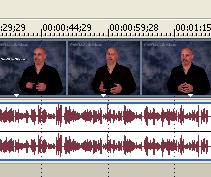
It may take a small amount of time to get the audio and video tracks synced perfectly, but it will be time well spent, as you can get far better audio this way than you could ever hope for from your camera’s built-in microphone.
And all by using an inexpensive digital voice recorder available at any office supply store.
Thanks Dave. Even though it is a bit more work on the production end, and one has to make sure the presenter starts the recorder, this is a great tip.
Do you have any suggestions for a good lav mic?
Thank you for the advice! It’s brillant!
I’m a high school teacher who teaches media. I bought two HardDisk recording Sony camcorders. They have no mic inputs (why did manufacturers stop adding this?)
My only option was to shoot wide and close. Otherwise, I would have had to buy radio lapel mics –> but they’re expensive, even for one! but again, the camcorder has no mic input.
Thanks for the solution! Just one question: will I be assured that the digital voice recorder will run at a consistent speed and not “slip” out of synch when linked with the video?
It should work OK but there are no guarantees in the world of video. It’s a lot of trial and error.
Cool! Perfect Idea man thanks! Can you recommend me some good video editing software?
@JosephXV – Sony Vegas on Windows or Final Cut on a Mac