
About 6 months ago, Canon released a new video camera called the Vixia HF S10. It instantly earned rave reviews and was even used to shoot parts of a Hollywood movie.
I personally use this camera, it’s my current “best” camera recommendation and you can see my video review of it by clicking here.
But this week Canon announced a newer and better camera, the Vixia HF S11. It will be available in the US in September 2009 with a street price of around $1,400 (it’s been available in Japan for some time).
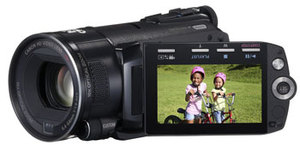
So what are the major differences between the HF S10 and HF S11?
In one word, memory. The current HF S10 comes with 32GB of internal Flash memory, with the ability to add another 32GB through an SD card.
The new HF S11 comes with 64GB of internal memory…enough to record 24 hours of full HD footage…plus the ability to add more through as SD card (which you’ll probably never need).
The HF S11 also promises improved video quality (though the HF S10 is already tough to beat) and the option to control the camera remotely though popular 3rd party controllers.
If you already have the Vixia HF S10 don’t be sad though…a year from now there will be models that dwarf the performance specs of the HF S11…and plenty of people who will buy your HF S10. You see, progress is a good thing.
How exactly does canon claim to improve video quality? I haven’t been to the canon site, but have watched the clips you’ve shot with the hfs10 and can’t imagine how they could look any better!
Is it low light improvements perhaps?
Are the H S’s “down dumbable?” Can you shoot SD instead of HD if need be. Like the HV 20/30/40.
@Brooks – They’ve added some manual controls and updated/added some image processing stuff.
Their press release on everything is here:
http://www.businesswire.com/portal/site/home/permalink/?ndmViewId=news_view&newsId=20090819005030&newsLang=en
@Jonwillie – No…these cameras shoot HD only.
Dave, does it have a firewire outlet and a mic in?
Thanks. I’m currently using a HV20, Sony FX1, and Panasonic
150 mini with SD card. I found, the smaller, more convenient,
the more often-time you will reach for the camera.
I love my Sony FX1, but it’s easier to grab the others ..
And if the panasonic SDR 150 had a mic input (3 cc), it
would be my favorite for convenience and picture quality.
I just upgraded to Sony Vegas 9 and converted a video
to MP4. I was using Sony Vegas 7 for all my videos. I
cannot believe the difference in quality and sharpness
(and I don’t know what it is) using this software.
Thanks Dave. You’re a lifesaver.
Any plans for a live, hands-on seminar or with this
technology, is that too inconvenient to plan?
@Jeremy – The HF S10 and HF S11 are Flash-based cameras, so they connect to your computer via USB.
In this video on the HF S10, I demonstrate how footage is transferred to a computer:
http://webvideouniversity.com/podcast/video/2009/06/08/wvu-39-review-canon-vixia-hf-s10-part-2/
It also contains an external microphone jack (all Vixia cameras do).
@ Brooks: There are new night shooting modes, demonstrated on youtube already. And I believe you can shoot standard definition? I could be wrong though. If you can’t wait you can buy this on ebay already. And the menu can be changed to English.
Will there be a direct import into Final Cut without encoding like the JVC GY-HM100?
Thanks!
Paul
Lets just be a little careful on the terms we use.
It doesn’t record 24 hours of “full HD”,
It has 2 Full HD settings and they records 8 Hrs at 17Mbps and 6 at 24Mbps
It records 24hrs at LP 5Mpbs, this is not “Full HD” (1080i) but is the lowest video quality setting the camera allows
Either way this does seem like a great camera
How about Final Cut (Mac) compatibility in general?
@Constantino – See my video review of the HF S10 here:
http://webvideouniversity.com/podcast/video/2009/06/08/wvu-39-review-canon-vixia-hf-s10-part-2/
In it, I demonstrate using the camera in Final Cut.
I’m a podcast producer based in Tokyo and last week took delivery of the HF S11. I would just like to say that this camera is stunning! The picture quality is simply superb, and the image stabilisation is unlike anything I’ve seen on a consumer camera before.
I shot a video of a traditional Japanese dance festival last week – all handheld, and much of it filmed from quite a distance (link below).
We use it with the DM100 Directional Stereo Mic – superb piece of kit.
The battery life with the included BP-807 is dissapointing – about one hour in reality (we have now invested in the BP-827). We will also be buying a wide angle lens as for interviews you have to get a fair distance between the camera and the interviewee.
Can’t recommend this camera highly enough. Works wonderfully with Final Cut / iMovie too.
The version of our video we have on Facebook is the best quality upload we have, or there’s an MP4 available for download. You Tube version also available. The page in question is
http://pokya.jp/japanpodshow/2009/09/video-special-tokyo-koenji-awaodori-traditional-dance-festival-2009/
Joseph
Wouldn’t the HF S100 be a better buy since the price of memory is starting to come down?
I started to produce simple webcast. We are using Utream’s Watershed and have created a web based broadcast user interface using the embedded Flash Media Encoder. The broadcast is only a 320 x 240. Can anyone confirm if using a HD camera is possible? Will the Flash Media Encoder render/encode the signal to fit a 320 x 240 window/player.
I mostly want the Canon camera for the external mic option as well as the mini shoe.
Take a look at this sample and let me know what I can do to improve.
http://www.miller-jones.com/live/miller-jones
Thanks
@Edward – Most video streaming services don’t allow you to stream in HD…you need either an SD camera or an HD camera in SD mode. But you’d have to check with Watershed to see what they do/don’t support.
Thanks. I do not intend on streaming HD. Obviously the nature of video and the web traditionally having being limited to small video size and resolution.
1. I am would like to know if the Canon Vixia HD models also have a SD mode.
2. If not, can the embedded Flash Media encoder accept a HD feed and encode it to a SD stream.
Watershed has a user forum, but limited support.
Thanks
@Edward – It depends on the particular Vixia model. See Canon’s web site:
http://www.usa.canon.com/consumer/controller?act=ProductCatIndexAct&fcategoryid=173
And typically streaming services (ustream.tv, justin.tv, etc.) don’t accept HD cameras, but things are always changing on the web, so you have to contact/refer to customer support for the particular service you are using.
Thanks. The Vixia models only record in HD they do not have the option od switching to SD. It looks like the best option would be to use the FS22 model and use a third party shotgun mic (I was hoping to use be able to use the Canon DM-100 mic that would fit in the Vixia “advance shoe”).
I think the Canon HV40 can record in either HD or SD. Which makes it one of the better “legacy” (best of old technology)consumer cameras.
@Edward, @Jowillie is correct, the Vixia HV40 shoots either HD or SD (it’s a miniDV tape-based camera). Just make sure to never combine HD and SD footage on the same tape.
Would nyone know of a flash memory based camera that can shoot either HD or SD?
I just get a legria pal hfs11 ( ITALY ).
satisfied for the video quality, I have a canon HV20 too.
I dont’ like the editing with the PIXELA, I prefer Premiere elements 7
but I cannot write back the edited video to the flash mem, only for
the web. I did try the sony vegas, but this too, cannot write back
on the memory of the camera.
can You help me? many thanks, Ferry
I just purchased a CANON LEGRIA HFS11 (PAL) value up kit, (I own also
a Canon HV20). I dont’ like the bundled Pixela image mixer, too
poor, I use from so many years Adobe premiere, and from a year the
premiere elements 7, I edited the clips captured in premiere elements 7, but when I try to open the edited file saved to the PC hd, in the pixela mixer, with the purpose to write it back to the hfs11, the Pixela image mixer do not recognize the file codec, I understand that
the avch264 mpeg 4 codec are a little different, files extension
differs for mt2 and mt2s. I did try to use Sony Vegas, but no better result.
I did try to obtain support from Canon, they suggested to play the clips edited with premiere elements by the PC, but I would like the possibility to use the camera hfs11 too for play, it’s more fast, instead of disconnect all cables of the PC and place it near the
Television ( sony full HF 40″)via HDMI.
Many thanks for a reply.
Ferry
@ferry – The camera records using an AVCHD format. This is a recording format. After you have edited the video and converted it to something else, that video is in a playback format.
The camera is not a multi-media or home entertainment device. It’s designed to record video. Therefore, you cannot copy files onto the camera and expect them to play.
many thanks Dave, for your reply, may be I did not explain the problem due to my poor english.
the user guide of the canon HFS11 say: use the bundled PIXELA image mixer only to import video files recorded in the camera memory, and after edited with cuts and music added, you can write they back to
the hfs11,only using the Pixela image mixer, and this is O.K.
I got it. and was able as say the Canon Guide to use the camera, connected HDMI to the Sony TV.as a multimedia device….Furthermore on the first pages of the HFS11 guide, canon suggest you can insert the sdcard used for recording onto the SD slot of a HD TV ( like SHARP, or PANASONIC )
and play them directly, this is not corresponding to your explanation.
thank for an answer
ferry
What is the difference between these 2 cameras
Canon Legria HF S11 High Definition and the Canon Vixia HF S11 High Definition
Thank you
Jaye
ferry reply to Jave,
Legria is the name for the Europen market and the Television standard is PAL (phase alternate lines, 25 frames/second) Vixia for U.S.A. is N.T.S.C. standard at 30 frames/second. for precision there exist another television standard: S.E.C.A.M. adopted by France and Russia,and Francophone States A.S.O.
You can find more explanation on the WEB.
Ferry AMATEUR VIDEOMAKER,from Venice -Italy
HI if i just want to download the videos from the camera canon s11 to my MAC so i can work on it later , and how i can use it with final cut pro???? from what ever i saved on my mac (no camera).
i hope this clear.
thanks
ferry reply to Mohamed comment dated december 23 2009.
if your videoclip is on the memmory of the HFS11, go to the menu of the camera and copy the clip to an SD card, then extract the sd card,and insert it in the slot of your Mac, so You can open the clip using your edit program, after rendering you can play using the Mac.
If you want to use the camera for play back You MUST use the bundled
PIXELA software delivered toghether with the camera, for capture to the Computer and to export it back to the camera.but simply cuts and titles, no transitions or effects. I prefer (as I have window Vista) Adobe premiere elements 7, very simple but plenty of transitions and effects, in the past I used Premiere Pro,2, but it’s not compatible with Vista, and do not dispose of the new setting for H264.
I was looking at the HF20 but like what I see in the HFS11. Was wondering if not having a 15x zoom like in the HF20 is noticeable ? Also after recently shopping for SD cards and seeing how there are differnt class cards was wondering how the memory worked in the camera ?
Thanks
Carl
ferry replay to Carl.
I have the Canon HFS11 from october 2009, and if You like you can observe my test on YOUTUBE – VIDEO – then write: vecomterochebleu,
You can compare also a short my clip recorded with my old Canon HV20, a little less in resolution, vs the HFS11.
As for the SD card to use in the HFS11 for video rec. maximun bitrate Canon Manual indicates class 4 or high, I used the one delivered in the value up kit, ( 4 giga, class 4 ).
Ferry
I just got the HF S11 and love it. I don’t have the user mannual on me and was wondering the easiest/best way to transfer footage from the camera (internal memory) to a computer or external hardrive….
thanks!
@bridgeb8 – Just plug the camera into your computer via USB cable, then go into Windows Explorer or Finder (on a Mac), go to the camera, find and copy the files ending with the .mts extension and paste them to your hard drive. Then open them in your video editing app. Or watch this video:
http://webvideouniversity.com/podcast/video/2010/01/08/all-about-sdhc-memory-cards-for-video-wvu-67/
Hi,I have just purchased a HFS 10. great camera. Do you know if there is a way that I can use it as a webcam? I want to use it for ustream, but I can’t see where it is possible to use it this way.
Any help would be appreciated!
@Tim – To use a camera as a web cam, the camera must use Firewire connections (like a tape-based camera)…and the HF S10 is a Flash-based USB camera…so your computer just sees it as a storage device.
You can try to use the HF S10 as a web cam via an HDMI with a card like this:
http://www.blackmagic-design.com/products/intensity/
But you might run into headaches.
I just got the Canon HF S10 in part cause of your reviews. I have down loaded what I recorded using the included software on my computer. While playing it back it seems choppy. The video will pause while the sound is going. Any suggestions what I am doing wrong?
Meant to add, I am using Windows Vista.
@Carl – See this post:
http://webvideouniversity.com/blog/2009/10/16/how-to-fix-choppy-playback-from-avchd-video-cameras/
Dear Dave,
I also own the HF S10. Would you be able to go into more details on using the camera as a webcam? Since the PC sees it as a storage device, is there anything additional that needs to happen in order to make it function as a webcam. I have never used a fire-wire connection before. I am new to this.
@Melissa Wilson – The only way you can make a Flash/USB based video camera operate as a web cam is by using an HDMI capture card in your computer. Like this one:
http://www.blackmagic-design.com/products/intensity/
Even then you’ll likely run into headaches. At least for now, if you want to stream live, it’s best to use a DV/HDV camera.
Hello:
I’ve seen you guys have issues connecting your video camera for live streaming. Here is a tutorial explaining how to hook a Canon Vixia to your computer for streaming:http://www.thehdstandard.com/tutorials/how-to-connect-a-canon-vixia-hf-10-for-hd-video-streaming/
@ Melissa and Tim: Here is more about using Intensity Pro capture card: http://www.thehdstandard.com/hardwaresoftware-solutions-for-streaming/streaming-with-blackmagic-intensity-pro-capture-card/
Catalin
Professional Streaming Consultant
Does this camcorder record to 1080p? or 1080i Oo
Somepeople says 1080i can be Full HD, but as far as i know 1080i means 1440×1080 right?… holy shit i want this Camcorder, but i want a Full HD Camcorder, not 1080i…
Pls help me, there is a better choose than this one?
Thx a lot
I am considering the Canon HFS21. I was wondering if it works well with Final Cut express. Thank you for your advise.
@Clairandree – Final Cut will transcode the video from the Vixia into their ProRes 422 format during import. It takes a bit longer to transfer your footage because of this, but the end result is you can edit the footage in Final Cut without any issues.
Ferry for Clairandrée Cauchy.
At last I received my new HFS21 PAL, I have sold the HFS11, You can see my test on YOUTUBE: vecomterochebleu. As for editing I use Adobe premiere elements 7, output rendering full HD 1920×1080.
The HFS21 is very good, the new image stabilizer “powered” is amazing, like having the camera on a tripod, the resolution is a little better than the previous hfs11, and the viewfinder a must in location with bright sun. the custom key dial is better and easier, many image controls addedd.
Ferry